 RSS
RSS Twitter
 Facebook
Showing posts with label Introduction to Database. Show all posts
Database Management System × Introduction to Database
• Common for Web applications
• Intermediate Layer called Application Server or Web Server:
• Stores the web connectivity software and the business logic part
of the application used to access the corresponding data from the database
server
• Acts like a conduit for sending partially processed data between
the database server and the client.
• Three-tier Architecture Can Enhance Security:
• Database server only accessible via middle tier
• Clients cannot directly access database server

Classification
of DBMSs
• Based on the data model used
• Traditional: Relational,
Network, Hierarchical.
• Emerging: Object-oriented,
Object-relational.
• Other classifications
• Single-user (typically used
with personal computers) vs. multi-user (most DBMSs).
• Centralized (uses a single
computer with one database) vs. distributed (uses multiple computers, multiple
databases)
Variations of
Distributed DBMSs (DDBMSs)
• Homogeneous DDBMS
• Heterogeneous DDBMS
• Federated or Multidatabase
Systems
• Distributed Database Systems
have now come to be known as client-server based database systems because:
• They do not support a totally
distributed environment, but rather a set of database servers supporting a set
of clients.
Cost
considerations for DBMSs
• Cost Range: from free
open-source systems to configurations costing millions of dollars
• Examples of free relational DBMSs: MySQL,
PostgreSQL, others
Database Management System × Introduction to Database
• Specialized Servers with
Specialized functions
• Print server
• File server
• DBMS server
• Web server
• Email server
• Clients can access the
specialized servers as needed
Logical two-tier client server
architecture

Clients
• Provide appropriate interfaces
through a client software module to access and utilize the various server
resources.
• Clients may be diskless
machines or PCs or Workstations with disks with only the client software
installed.
• Connected to the servers via
some form of a network.
• (LAN: local area network, wireless network, etc.)
DBMS Server
• Provides database query and
transaction services to the clients
• Relational DBMS servers are
often called SQL servers, query servers, or transaction servers
• Applications running on clients
utilize an Application Program Interface (API) to access server databases
via standard interface such as:
• ODBC: Open Database
Connectivity standard
• JDBC: for Java programming
access
• Client and server must install
appropriate client module and server module software for ODBC or JDBC
Two Tier
Client-Server Architecture
• A client program may connect to
several DBMSs, sometimes called the data sources.
• In general, data sources can be
files or other non-DBMS software that manages data. Other variations of clients
are possible: e.g., in some object DBMSs, more functionality is transferred to
clients including data dictionary functions, optimization and recovery across
multiple servers, etc.
Database Management System × Introduction to Database
Centralized DBMS:
• Combines everything into single
system including- DBMS software, hardware, application programs, and user
interface processing software.
• User can still connect through
a remote terminal – however, all processing is done at centralized site.
A Physical Centralized Architecture

Architectures for DBMS have
followed trends similar to those generating computer system architectures.
Earlier architectures used mainframes computers to provide the main processing
for all system functions, including user application programs and user interface
programs as well all DBMS functionality. The reason was that most users accessed
such systems via computer terminals that did not have processing power and only
provided display capabilities. Therefore all processing was performed remotely
on the computer system, and only display information and controls were sent
from the computer to the display terminals, which were connected to central
computer via various types of communication networks.
As prices of hardware declined,
most users replaced their terminals with PCs and workstations. At first
database systems used these computers similarly to how they have used is play
terminals, so that DBMS itself was still a Centralized DBMS in which all the DBMS
functionality, application program execution and user interface processing were
carried out on one Machine.
Database Management System × Introduction to Database
The DBMS is a complex software
system.
Typical DBMS Component Modules

The figure is divided into two
halves. The top half of the figure refers to the various users of the database
environment and their interfaces. The lower half shows the internals of the
DBMS responsible for storage of data and processing of transaction.
The database and the DBMS catalog
are usually stored on disk.Access to the disk is primarily controlled by
operating system(OS).which inclues disk input/Output.A higher level stored data
manager module of DBMS controls access to DBMS information that is stored on
the disk.
If we consider the top half of
the figure, It shows interfaces to DBA staff, casual users, application
programmers and parametric users
The DDL compiler processes schema
definitions, specified in the DDL,and stores the description of the schema in
the DBMS Catalog..The catalog includes information such as names and sizes of
the sizes of the files, data types of data of data items. Storage details of
each file, mapping information among schemas and constraints.
Casual users and persons with
occasional need of information from database interact using some for of
interface which is interactive query interface. The queries are parsed, analysed
for correctness of the operations for
the model. the names of the data
elements and so on by a query compiler that compiles them into internal form.
The internal query is subjected to query optimization..The query optimizer is
concerned with rearrangement and possible recording of operations, eliminations
of redundancies.
Application programmer writes
programs in host languages. The precompiler extracts DML commands from an
application program
Database Management System × Introduction to Database
• Programmer interfaces for
embedding DML in a programming languages:
• Embedded Approach: e.g
embedded SQL (for C,C++, etc.), SQLJ (for Java)
• Procedure Call Approach:
e.g. JDBC for Java, ODBC for other programming
languages
• Database Programming
Language Approach:
e.g. ORACLE has PL/SQL, a
programming language based on SQL;
language incorporates SQL and its
data types as integral components/
User-Friendly
DBMS Interfaces
• Menu-based, popular for browsing
on the web
• Forms-based, designed for naïve
users
• Graphics-based (Point and
Click, Drag and Drop, etc.)
• Natural language: requests in
written English
• Combinations of the above:For
example, both menus and forms usedextensively
in Web database interfaces
Other DBMS
Interfaces
• Speech as Input and Output
• Web Browser as an interface
• Parametric interfaces, e.g.,
bank tellers using function keys.
• Interfaces for the DBA:
• Creating user accounts,
granting authorizations
• Setting system parameters
• Changing schemas or access paths
Database Management System × Introduction to Database
Used to specify database
retrievals and updates DML commands (data sublanguage) can be embedded in a
general-purpose programming language (host language), such as COBOL, C,
C++, or Java.
• A library of functions can also
be provided to access the DBMS from a programming language
• Alternatively, stand-alone DML
commands can be applied directly (called a query language).
Types of DML
• High Level or Non-procedural
Language:
For example, the SQL relational
language are “set”-oriented and specify what data to retrieve rather than how
to retrieve it. Also called declarative languages.
• Low Level or Procedural
Language: Retrieve data one record-at-a-time; Constructs such as looping
are needed to retrieve multiple records, along with
positioning pointers.
DBMS Interfaces
• Stand-alone query language
interfaces
Example: Entering SQL queries at
the DBMS interactive SQL interface (e.g.
SQL*Plus in ORACLE)
• Programmer interfaces for
embedding DML in programming languages
• User-friendly interfaces
• Menu-based, forms-based, graphics-based,
etc.
Database Management System × Introduction to Database
Used by the DBA and database
designers to specify the conceptual schema of a database.
• In many DBMSs, the DDL is also
used to define internal and external schemas
(views).
• In some DBMSs, separate storage
definition language (SDL) and view definition language (VDL) are used to define
internal and external schemas.
• SDL is typically realized via
DBMS commands provided to the DBA and database designers
Database Management System × Introduction to Database
• Data Definition Language (DDL)
• Data Manipulation Language
(DML)
• High-Level or Non-procedural
Languages: These include the relational language SQL
• May be used in a standalone way
or may be embedded in a programming language
• Low Level or Procedural
Languages: These must be embedded in a programming language
Database Management System × Introduction to Database
• Database State: Refers to the content
of a database at a moment in time.
• Initial Database State: Refers
to the database state when it is initially loaded into the system.
• Valid State: A state that
satisfies the structure and constraints of the database.
• Distinction
The database schema changes
very infrequently.
The database state changes
every time the database is updated
• Schema is also called intension
• State is also called extension
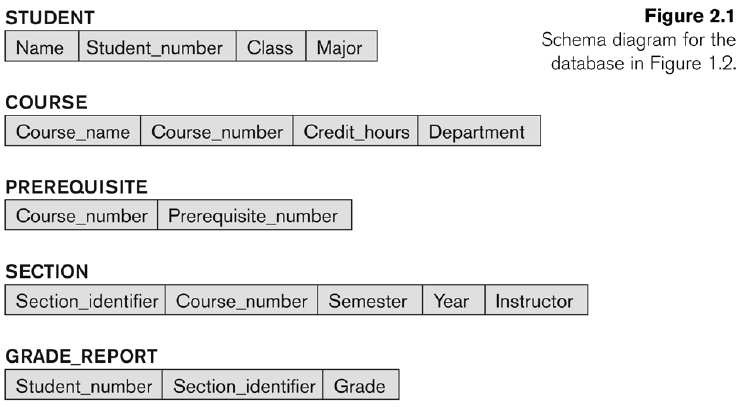
Example of a Database
Schema
Database Management System × Introduction to Database
• Database Schema: The description
of a database.
Includes descriptions of the
database structure, data types, and the constraints on the database.
• Schema Diagram: An illustrative
display of (most aspects of) a database schema.
• Schema Construct:
A component of the schema
or an object within the schema, e.g., STUDENT,
COURSE.
• Database State: The actual data
stored in a database at a particular moment in time. This includes the
collection of all the data in the database. Also called database instance (or
occurrence or snapshot).
• The term instance is also
applied to individual database components, e.g. record instance, table
instance, entity instance
Database Management System × Introduction to Database
• Most Recent Trend. Started with
Informix
• Universal Server.
• Relational systems incorporate
concepts from object databases leading to objectrelational.
• Object Database Standard:
ODMG-93, ODMG-version 2.0,ODMG-version 3.0.
• Exemplified in the latest
versions of Oracle-10i,DB2, and SQL Server and other DBMSs.
• Standards included in SQL-99
and expected to be enhanced in future SQL standards.
Database Management System × Introduction to Database
• Several models have been
proposed for implementing in a database system.
• One set comprises models of
persistent O-O Programming Languages such as C++ (e.g., in OBJECTSTORE or
VERSANT), and Smalltalk (e.g., in GEMSTONE).
• Additionally, systems like O2,
ORION (at MCC – then ITASCA), IRIS (at H.P.- used in Open OODB).
Database Management System × Introduction to Database
A hierarchical data model is a
data model which the data is organized into a tree like structure. The
structure allows repeating information using parent/child relationships: each
parent can have many children but each child only has one parent. All attributes
of a specific record are listed under an entity type.

Advantages:
1. The representation of records
is done using an ordered tree, which is natural method of implementation of one–to-many
relationships.
2. Proper ordering of the tree
results in easier and faster retrieval of records.
3. Allows the use of virtual
records. This result in a stable database especially when modification of the
data base is made.
Database Management System × Introduction to Database
The data in the network model are
represented by collection of records and relationships among data are
represented by links, which can be viewed as pointers.

The records in the database are
organized as collection of arbitrary groups.
Advantages:
1. Representation of relationship
between entities is implemented using pointers which allows the representation
of arbitrary relationship
2. Unlike the hierarchical model
it is easy.
3. data manipulation can be done easily with this
model.
Database Management System × Introduction to Database
The Relational Model uses a
collection of tables both data and the relationship among those data. Each
table have multiple column and each column has a unique name .
Relational database comprising of
two tables
Customer –Table.

Customer Preethi and Rocky share
the same account number A-111
Advantages
1. The main advantage of this
model is its ability to represent data in a simplified
format.
2. The process of manipulating
record is simplified with the use of certain key
attributes used to retrieve data.
3. Representation of different
types of relationship is possible with this model.
Database Management System × Introduction to Database
A model is an abstraction process
that hides superfluous details. Data modeling is used for representing entities
of interest and their relationship in the database.
Data model and different types of
Data Model
Data model is a collection of
concepts that can be used to describe the structure of a database which
provides the necessary means to achieve the abstraction. The structure of a
database means that holds the data.
=>relationships
=>constraints
Types of Data
Models
1. High Level- Conceptual data
model.
2. Low Level – Physical data
model.
3. Relational or Representational
4. Object-oriented Data Models:
5. Object-Relational Models:
1. High Level-conceptual data
model: User level data model is the high level or conceptual model. This
provides concepts that are close to the way that many users perceive data.
2 .Low level-Physical data model
: provides concepts that describe the details of how data is stored in the
computer model. Low level data model is only for Computer specialists not for
end-user.
3. Representation data model: It
is between High level & Low level data model Which provides concepts that
may be understood by end-user but that are not too far removed from the way
data is organized by within the computer.
Database Management System × Introduction to Database
• Traditional Applications:
Numeric and Textual Databases
• More Recent Applications:
Multimedia Databases
Geographic Information Systems
(GIS)
Data Warehouses
Real-time and Active Databases
Many other applications
Database Management System × Introduction to Database
Data independence can be defined
as the capacity to change the schema at one level without changing the schema
at next higher level. There are two types of data Independence. They are
1. Logical data independence.
2. Physical data independence.
1. Logical data independence is
the capacity to change the conceptual schema without having to change the
external schema.
2. Physical data independence is
the capacity to change the internal schema without changing the conceptual
schema.
When not to use
a DBMS
• Main inhibitors (costs) of
using a DBMS:
• High initial investment and
possible need for additional hardware.
• Overhead for providing
generality, security, concurrency control, recovery, and integrity functions
When a DBMS may be unnecessary:
• If the database and
applications are simple, well defined and not expected to change.
• If there are stringent
real-time requirements that may not be met because of DBMS overhead.
• If access to data by multiple
users is not required.
• When no DBMS may suffice:
• If the database system is not
able to handle the complexity of data because of modeling limitations
• If the database users need special operations not
supported by the DBMS.
Database Management System × Introduction to Database
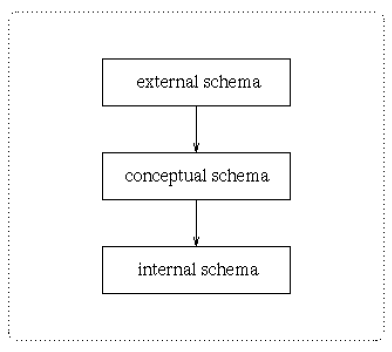
A commonly used views of data
approach is the three-level architecture suggested by ANSI/SPARC (American
National Standards Institute/Standards Planning and
Requirements Committee).
ANSI/SPARC produced an interim report in 1972 followed by a final report in
1977. The reports proposed an architectural framework for databases. Under this
approach, a database is considered as containing data about an enterprise.
The three levels of the architecture are three different views of the data:
External -
individual user view
Conceptual -
community user view
Internal -
physical or storage view
The three level database
architecture allows a clear separation of the information meaning (conceptual
view) from the external data representation and from the physical data structure
layout. A database system that is able to separate the three different views of
data is likely to be flexible and adaptable. This flexibility and adaptability
is data independence that we have discussed earlier.
We now briefly discuss the three
different views.
The external level is the view
that the individual user of the database has. This view is often a restricted
view of the database and the same database may provide a number of different
views for different classes of users. In general, the end users and even the application
programmers are only interested in a subset of the database. For example, a department
head may only be interested in the departmental finances and student enrolments
but not the library information. The librarian would not be expected to have any
interest in the information about academic staff. The payroll office would have
no interest in student enrolments.
The conceptual view is the
information model of the enterprise and contains the view of the whole
enterprise without any concern for the physical implementation. This view is normally
more stable than the other two views. In a database, it may be desirable to change
the internal view to improve performance while there has been no change in the conceptual
view of the database. The conceptual view is the overall community view of the
database and it includes all the information that is going to be represented in
the database. The conceptual view is defined by the conceptual schema which
includes definitions of each of the various types of data.
The internal view is the view
about the actual physical storage of data. It tells us what data is stored in
the database and how. At least the following aspects are considered at this
level:
Storage allocation e.g. B-trees,
hashing etc.
Access paths e.g. specification
of primary and secondary keys, indexes and pointers and sequencing.
Miscellaneous e.g. data
compression and encryption techniques, optimization of the internal structures.
Efficiency considerations are the
most important at this level and the data structures are chosen to provide an
efficient database. The internal view does not deal with the physical devices
directly. Instead it views a physical device as a collection of physical pages
and allocates space in terms of logical pages.
The separation of the conceptual
view from the internal view enables us to provide a logical description of the
database without the need to specify physical structures. This is often called physical
data independence. Separating the external views from the conceptual view
enables us to change the conceptual view without affecting the external views.
This separation is sometimes called logical data independence.
Assuming the three level view of
the database, a number of mappings are needed to enable the users working with
one of the external views. For example, the payroll office may have an external
view of the database that consists of the following information only:
Staff number, name and address.
Staff tax information e.g. number
of dependents.
Staff bank information where
salary is deposited.
Staff employment status, salary
level, leave information etc.
The conceptual view of the
database may contain academic staff, general staff, casual staff etc. A mapping
will need to be created where all the staff in the different categories are
combined into one category for the payroll office. The conceptual view would
include information about each staff's position, the date employment started,
full-time or parttime etc. This will need to be mapped to the salary level for
the salary office. Also, if there is some change in the conceptual view, the
external view can stay the same if the mapping is changed.
Database Management System × Introduction to Database
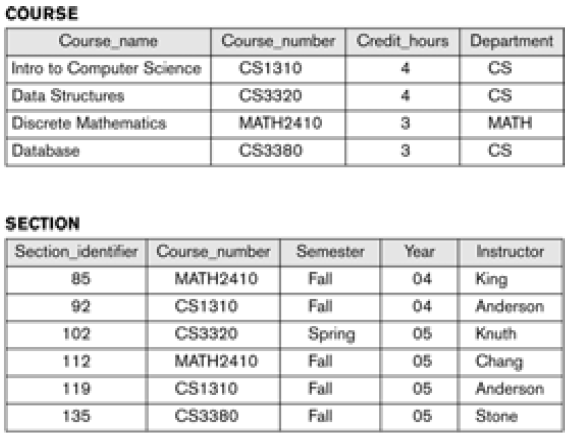
• Mini-world for the example:
Part of a UNIVERSITY environment.
• Some mini-world entities:
STUDENTs
COURSEs
SECTIONs (of COURSEs)
(academic) DEPARTMENTs
INSTRUCTORs
Example of a
Database (with a Conceptual Data Model)
• Some mini-world relationships:
SECTIONs are of specific
COURSEs
STUDENTs take SECTIONs
COURSEs have prerequisite
COURSEs
INSTRUCTORs teach SECTIONs
COURSEs are offered by
DEPARTMENTs
STUDENTs major in DEPARTMENTs
Example of a simple Database

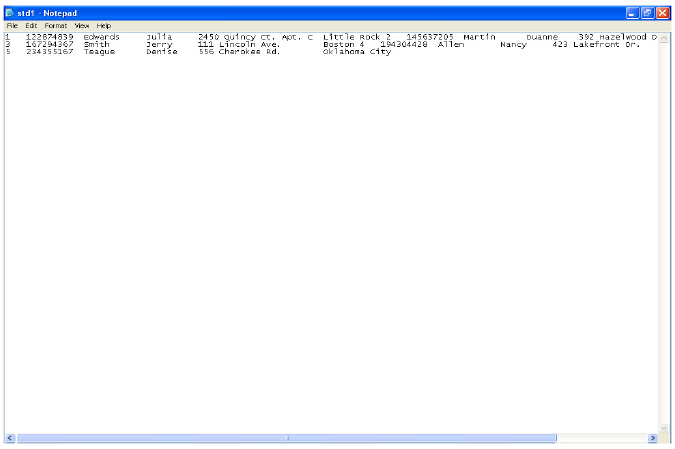
Example of a Student File

Example of a simplified database catalog


